✅ Free and no registration. — service terms ▾
- Files are deleted from the server after 24 hours.
- PDF до 100 МБ и 400 страниц.
- No paid features: you only pay for printing, if you order it.
Brochure from PDF online: imposition in a minute
Upload a page-by-page PDF — the service will impose the pages onto sheets for a saddle-stitched brochure: it will add blank pages up to a multiple of 4, arrange the sheets for double-sided printing, account for the shift of inner sheets and draw cut and fold marks. You can print it as a booklet at home on A4 or prepare a file for the print shop.
1. Brochure file
2. What you need to get
Needed only if the page count is not a multiple of 4. The list of added pages will appear on the right.
- Open PDF и onжмите «Printing», масpcаб — 100 % (без «вписать»).
- Double-sided printing with переворfromом по корfromкому краю. If your printer is single-sided, first print the odd pages of the PDF, then flip the stack and print the even ones.
- Сложите стопку пополам и скрепите степлером по сгибу.
3. Review and download
Порядок полос on всех листах
A page-by-page PDF with bleeds is attached to the order — prepress will do the imposition for our press. The page count, format and color mode will be filled into the calculator automatically.
All parameters in the calculator →How to make a brochure from a PDF
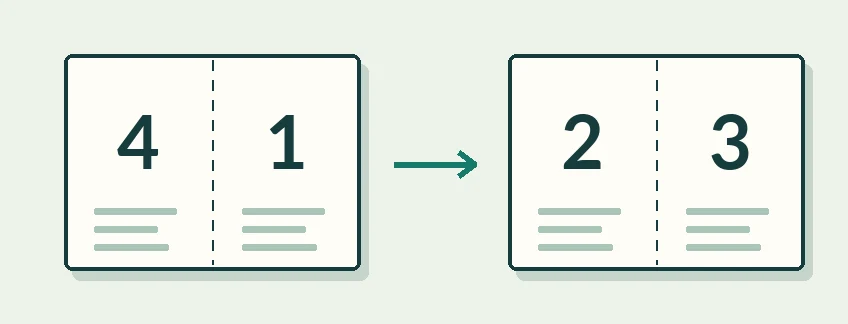
A saddle-stitched brochure is assembled from sheets folded in half and stitched along the fold. If you simply print a PDF in order, the pages will end up scrambled: on the first sheet the last and first pages must stand side by side, and on the back the second and second-to-last. Printing houses call this arrangement of pages on sheets imposition — the service does it automatically.
- Сохраните брошюру в PDF постранично — по одной полосе on страницу, with обложкой. Bleeds 2–3 mm, если фон доходит до края.
- Upload a file: the page format and bleeds are detected automatically.
- Choose the mode: imposition on a press sheet, booklet printing at home, or a file for the print shop.
- Проверьте превью листов и скачайте PDF — or forкажите printing в калькуляторе брошюр.
What делает спуск полос
Pads the page count to a multiple of 4 with blank pages, places the pages on a sheet twice the width of the format (A5 on A4 or SRA4, A4 on A3 or SRA3), alternates front and back for double-sided printing, shifts the pages of inner sheets toward the spine by the paper thickness, and draws cut marks and a fold line outside the format. Pages are transferred as they are — vector text and fonts are not rasterized.
Questions and answers
What такое спуск полос и forчем он нужен?
Спуск полос — это раскладка страниц брошюры по печатным листам так, чтобы после seals с двух сторон, фальцовки и сшивки страницы шли по порядку. For брошюры on 8 страниц on первом листе с лица стоят полосы 8 и 1, with оборfromа — 2 и 7. Service считает этfrom порядок сам для любого числа страниц.
Why число страниц должно быть кратно 4?
A saddle-stitched brochure is assembled from sheets folded in half, and each such sheet has 4 pages. If there are 10 pages, the service will add 2 blank ones — at the end or before the back cover, as you choose, and will show which pages they are.
How do I print a brochure at home on a regular printer?
Choose the “Print booklet at home” mode and download the PDF: each A4 sheet carries two pages. In the print settings, enable double-sided printing with flip on the short edge and 100% scale. Fold the stack in half and staple along the fold.
What такое компенсация сдвига (creep)?
The inner sheets of a thick brochure stick out after folding, and more is trimmed off them when cutting. Compensation shifts the pages of the inner sheets toward the spine by the thickness of the paper — 0.1 mm per sheet for ordinary paper, 0.15 mm for heavy paper. For brochures up to 16 pages it can be left off.
Сколько страниц можно сшить on скрепку?
Usually up to 60–64 pages: a thicker booklet does not close well and may tear at the fold. For bulky catalogs, a spiral or adhesive binding is better — those options are also available in the calculator.
How to order brochure printing?
Click "Order printing": the file will be attached to the order, and the format, number of pages and color mode will already be in the calculator. For print shop production, our prepress does the page imposition for the specific machine, so a page-by-page PDF is attached to the order — it is more reliable. "L7Print" print shop, Yekaterinburg.