


REQUIREMENTS FOR PROVIDED ORIGINAL LAYOUTS (offset and digital printing)
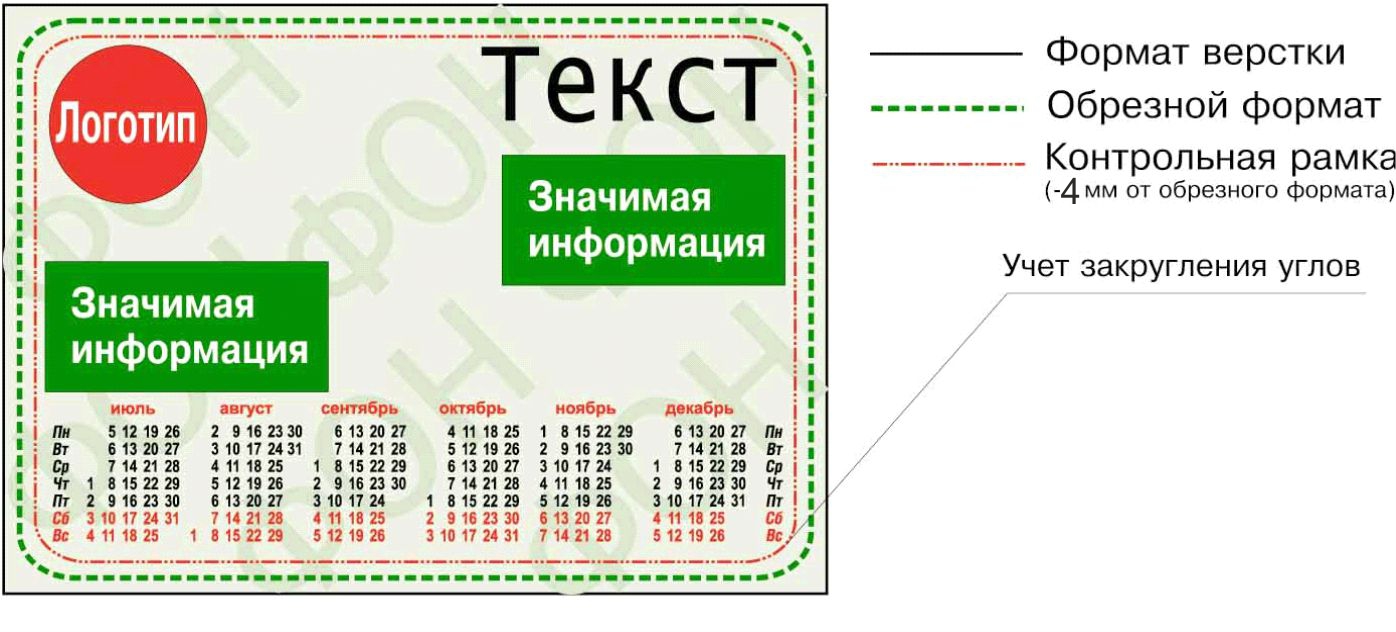
- Original layouts (OL) are accepted in electronic form.
- When sending by email, the attachment size should not exceed 30 Mb. Links to download files from external resources (Cloud.Mail, Yandex.Disk, etc.) are allowed.
- OM is provided in CorelDraw, Adobe Illustrator, Adobe InDesign, Adobe Photoshop, Adobe Acrobat, png, tif, jpg format.
- The OM file must meet the following conditions:
- — All colors are in CMYK format, all raster images are in CMYK format.
- — Text must be converted to curves. If this is not possible, font files must be attached.
- — The layout must not contain any additional information (trim marks, color names, comments, etc.)
- — Corner rounding does not need to be indicated in the layout.
- — The bleed beyond the trim format must be uniform on all sides and amount to 2 mm. Important information (text, calendar grid, logos, etc.) must not be placed near the trim format boundaries, as cutting accuracy can vary up to ± 2 mm.
- — It is considered correct to place such information no closer than 4 mm from the trim format boundaries and from the fold line, i.e., no closer than 6 mm from the layout boundaries, taking into account corner rounding, i.e., not extending beyond the red control frame in the figure shown.
- — The file size must exactly match the product format with 2 mm bleeds.
- — When using raster formats (tif, jpg), a resolution of 300-600 dpi is recommended.
- Below are typical situations where a discrepancy between the finished product and what you see on your monitor is most likely:
- — Presence of OLE objects in the layout. – may disappear or have distorted color.
- — Overprint mode is enabled for non-black elements – unexpected color combinations, including the disappearance of white elements.
- — The element has both 'non-printing' and 'visible' attributes – the element may disappear.
- — The element has both 'printing' and 'invisible' attributes – an undesirable element may appear.
- — The element has a 'locked' attribute – the element may disappear.
- — Text is not converted to curves – another typeface may be substituted. In the case of using 'standard' Windows fonts – Arial, Tahoma, etc. – even greater problems are possible – substitution of Cyrillic characters with those from the Western European encoding.
- — Presence of extraneous elements in the layout (in the margins, for example) – elements may end up in the print, also distorting the proportions of the main layout.
- — The relative position of the front and back sides is not obvious and was laid out incorrectly by the client – the relative position of the front and back may be incorrect.
- — Effects in CorelDraw are used - 'Drop Shadow', 'Lens', etc. – many options for layout distortion. If it is necessary to use these tools, these elements should be rasterized after application.
- — The layout contains RGB objects (primarily raster) - these objects may be output in grayscale mode or with muted, subdued colors (when output from CorelDraw).
Additional requirements (important for print quality)
Рекомендуемый format файла — PDF/X-1a
- It is best to send the finished layout in PDF/X-1a (or PDF/X-4): this format "bakes in" fonts, colors and geometry and eliminates up to 90% of typical preparation errors.
- PDF — without crop marks, comments and non-printing objects; CMYK color; version 1.5 or higher; no open layers.
Суmmарное onложение красок — not более 300%
- Суmmа каonлов CMYK on плашках и photoграфиях not должon превышать 300% (C+M+Y+K ≤ 300). Excess ink dries poorly, smudges and offsets onto neighboring sheets.
- Each ink used must be at least 5%, otherwise a weak tint may disappear in printing.
Black color: глубокий чёрный и мелкий текст
- Large black solids and backgrounds — «глубокий чёрный», onпример C40 M30 Y30 K100 (within 300%). Only K100 over a large area looks grey.
- Small black text and thin lines — строго в одну краску C0 M0 Y0 K100. Composite black on small text causes "doubling" due to ink misregistration.
Прозрачности и эффекты — растрировать
- Эффекты прозрачности, тени (Drop Shadow), линзы (Lens), gradient mesh перед fromправкой растрируйте в единое изображение (Bitmap, CMYK, 300 dpi) — иonче возможны искажения и «выпадение» элементов.
Minimum line and reverse-out thickness
- Single-color line — thicker 0.05 mm (0.15 pt); multicolor and white (reverse) — no thinner than 0,5 pt.
- Do not place thin white text and small elements as knockouts on a multicolor background — if the inks are misregistered, they "fill in".
Resolution изображений
- Оптимально 300 dpi в onтhoorayльную величину (допустимо 250–350). Ниже 250 dpi typeon «лесенка»; выше 350 — only лишний вес файла без выигрыша в качестве.